 artembru
9129c395d8
artembru
9129c395d8
Deleted website URL

(cherry picked from commit 3a3ffc8dcf67a038fb752af9b216cdaaf440bd2e)
258 lines
11 KiB
Markdown
258 lines
11 KiB
Markdown
# Twake Mail Client
|
|
|
|
[](
|
|
https://github.com/linagora/tmail-flutter/graphs/contributors
|
|
)
|
|
[](https://github.com/linagora/tmail-flutter/issues)
|
|
[](docs)
|
|
[](https://play.google.com/store/apps/dev?id=8845244706987756601)
|
|
[](https://apps.apple.com/gr/developer/linagora/id1110867042)
|
|
[](https://hub.docker.com/r/linagora/tmail-web)
|
|
[](https://gitter.im/linagora/team-mail?utm_source=badge&utm_medium=badge&utm_campaign=pr-badge)
|
|
|
|
<p align="center">
|
|
<a href="https://github.com/linagora/twake-mail">
|
|
<img src="https://github.com/artembru/tmail-flutter/assets/146178981/c00629de-cfc3-4b7b-9560-9ac8e64fa91c" alt="Logo">
|
|
</a>
|
|
|
|
|
|
|
|
|
|
|
|
|
|
<p align="center">
|
|
<a href="https://twake-mail.com">Website</a>
|
|
•
|
|
<a href="https://github.com/linagora/tmail-flutter/issues">Report Bug</a>
|
|
</p>
|
|
</p>
|
|
|
|
---
|
|
|
|
|
|
|
|
This project aims at providing a multi-platform mobile email application, running the [JMAP protocol](https://jmap.io/) and will also deliver additional
|
|
features to the [Twake Mail back-end](https://github.com/linagora/tmail-backend).
|
|
|
|
Twake Mail is developed with love by [Linagora](https://linagora.com).
|
|
|
|
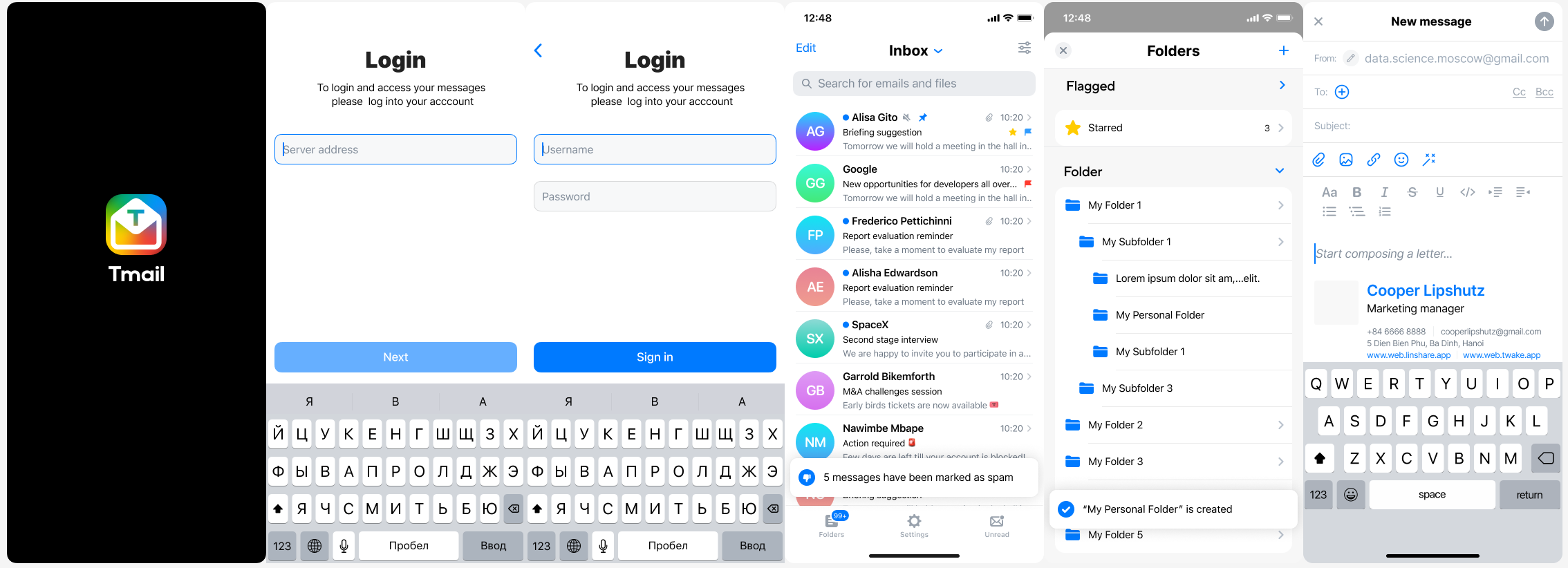
Here is how Twake Mail looks like on a phone:
|
|
|
|
|
|
|
|
|
|
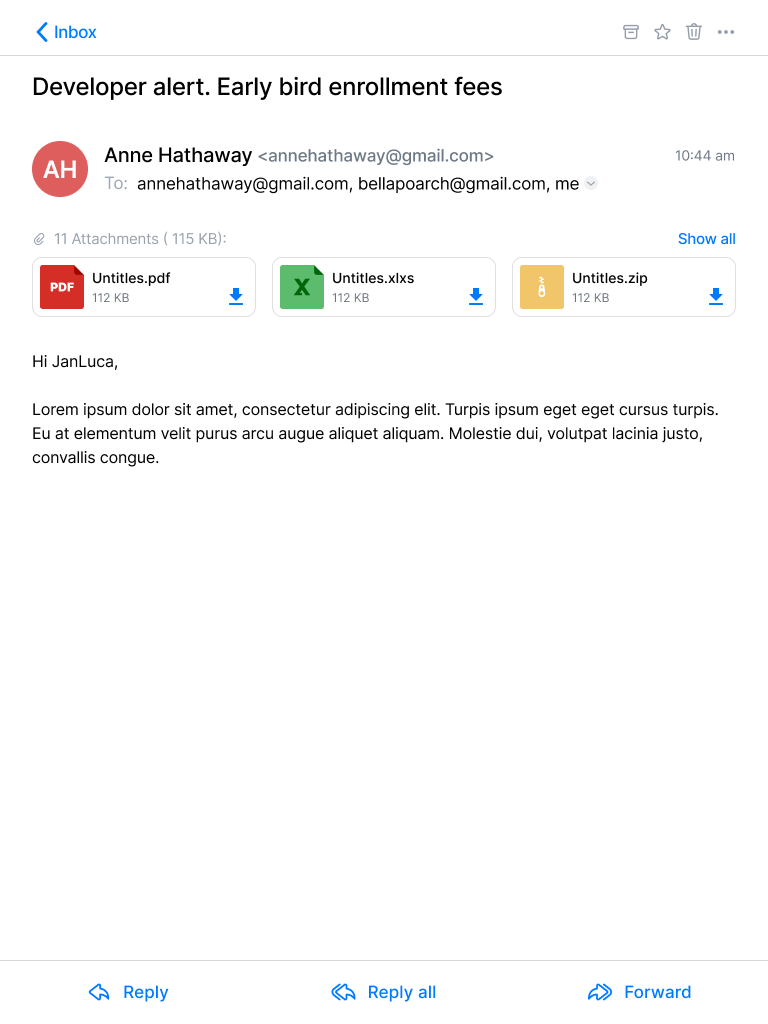
Here is how Twake Mail looks like on a tablet:
|
|
|
|
|
|
|
|
|
|

|
|
|
|
## Build app
|
|
1. Go to root folder of project
|
|
2. Run `prebuild.sh` script
|
|
```
|
|
/bin/bash prebuild.sh
|
|
```
|
|
3. Build
|
|
+ iOS:
|
|
```
|
|
flutter build ios
|
|
```
|
|
|
|
+ Android:
|
|
```
|
|
flutter build apk
|
|
```
|
|
|
|
+ Web:
|
|
|
|
change `SERVER_URL` in `env.file` with your JMAP server
|
|
```
|
|
SERVER_URL=http://your-jmap-server.domain
|
|
```
|
|
then run:
|
|
```
|
|
flutter build web
|
|
```
|
|
or you can find our images in: https://hub.docker.com/r/linagora/tmail-web
|
|
|
|
## FAQ
|
|
|
|
### **Why did you choose JMAP?**
|
|
|
|
<details>
|
|
<summary>Read more...</summary>
|
|
That is a good question! **IMAP** is THE ubiquitous protocol people use to read their emails, THE norm.
|
|
|
|
Yet **IMAP** had been designed in another age, which resulted in a chatty patchwork of extensions. **IMAP** lacks decent synchronization primitives to address real-time challenges modern mobile fleet requires, it consumes a lot of bandwidth, requires a lot of round trips which means high latency.
|
|
|
|
We are not alone to say this! Big players of the field started their own [proprietary](https://developers.google.com/gmail/api) [protocols](https://docs.microsoft.com/en-us/exchange/clients/exchange-activesync/exchange-activesync?view=exchserver-2019) to address IMAP flaws, and inter-operable standard was yet to be found...
|
|
|
|
This, is where **[JMAP](https://jmap.io/)** comes to play! **JMAP** builds on decades of experience, and beautifully addresses these challenges using `HTTP` and `JSON` standards. Not only does it make applications easier to develop, we also strongly believes it results in an improved experience for the end user.
|
|
</details>
|
|
|
|
### **Can I use Twake Mail with *any* JMAP server?**
|
|
|
|
Yes, you can use the Twake Mail application with any JMAP server and benefits from **Twake Mail**'s ease of use.
|
|
|
|
### **I don't understand your app... I need help using it! HELP MEEEEEE...**
|
|
|
|
<details>
|
|
<summary>Read more...</summary>
|
|
Don't worry, we are here!
|
|
|
|
We plan on writing a user documentation, helping you navigating around the application, and detailing the few configurations you have to perform.
|
|
|
|
If what you are looking for is not in the *user guide* then ask us directly in the [issues](https://github.com/linagora/tmail-flutter/issues) first, we would be glad to help. But also glad to improve our documentation and maybe tweak slightly our UI (user interface).
|
|
</details>
|
|
|
|
### **What platforms do you (plan to) target?**
|
|
|
|
<details>
|
|
<summary>Read more...</summary>
|
|
First, we target Android, iOS mobiles. We also take care of tablets and large rendering space early on in the development process.
|
|
|
|
Then, we plan on introducing a desktop application.
|
|
|
|
This versatility is enabled by the use of the [Flutter framework](https://flutter.dev/).
|
|
</details>
|
|
|
|
### **What would your roadmap look like?**
|
|
|
|
<details>
|
|
<summary>Read more...</summary>
|
|
Now that we plan having a simple JMAP email client supporting Android, IOS, and a webmail, we are working on some extra features on top of the TeamMail backend, including:
|
|
|
|
- Better filters, with more actions, and combining conditions
|
|
- Restoring deleted messages
|
|
- Delegating full access to others for instance your security
|
|
- Labels for better sorting your emails across folders
|
|
- Automated actions: archiving, emptying your trash, your spam folders
|
|
- Running filters against a folder
|
|
- Attachment thumbnails
|
|
|
|
We are also planning active work on drag and drops and other user experience / productivity enhancements.
|
|
|
|
We do not currently plan working on desktop applications, on websockets for push on top of TeamMail web but such contributions would be appreciated. We also
|
|
welcome feedback and pull requests regarding Team-Mail portability (running TeamMail on top of third party mail servers).
|
|
|
|
First, we plan to write a simple, multi-platform JMAP email client. This includes reading your mails and mailboxes, managing them, sending emails, searching your emails.
|
|
This will likely keep us busy by the end of 2021.
|
|
|
|
Then, we have plan for multiple features including:
|
|
|
|
- Support for Twake Mail encrypted mailbox (GPG)
|
|
- Interactions with some other software from [Linagora](https://linagora.com) including:
|
|
- Sending attachments via [TDrive](https://github.com/linagora/TDrive) file sharing platform.
|
|
- Transferring some attachments you received to [TDrive](https://github.com/linagora/TDrive) file sharing platform.
|
|
- Discussing some emails you received via [Twake](https://twake.app/en/) chat.
|
|
</details>
|
|
|
|
### **Any chance to support JMAP extension for calendar, contacts?**
|
|
|
|
No we do not plan to support such extensions, that are currently not standardized as RFCs, nor implemented on the Twake Mail backend.
|
|
|
|
### **Do you have a web application for Twake Mail?**
|
|
|
|
<details>
|
|
<summary>Read more...</summary>
|
|
Yes! It is still in early development but we do have one. It's easy for you to use locally, as you can just build a Docker
|
|
image locally from the sources of this repository, or even use our official Docker image `linagora/tmail-web`.
|
|
|
|
The web-app needs to include an environment file though (here you can see the dummy `env.file` at the root of the project),
|
|
with a `SERVER_URL` parameter, so it knows to which backend it needs to connect to.
|
|
|
|
For this to run it locally for example, 2 ways:
|
|
|
|
#### Edit the environment file before the build
|
|
|
|
Edit the `env.file` by replacing the default value of `SERVER_URL` to the one pointing to your JMAP backend server.
|
|
Then build your docker image:
|
|
|
|
```bash
|
|
docker build -t tmail-web:latest .
|
|
```
|
|
|
|
Then you can just simply run your web-app like this:
|
|
|
|
```bash
|
|
docker run -d -ti -p 8080:80 --name web tmail-web:latest
|
|
```
|
|
|
|
Then go to http://localhost:8080 and you should be able to login against your JMAP backend using the Twake Mail web-app.
|
|
|
|
#### Mount an environment file when running the container
|
|
|
|
You can use our official image `linagora/tmail-web` or just build the docker image locally without any prior changes:
|
|
|
|
```bash
|
|
docker build -t tmail-web:latest .
|
|
```
|
|
|
|
From then, create at the root of the project an environment file (like `env.dev.file`) where you put the `SERVER_URL`
|
|
you want to connect to. Then, to mount it and override the default one while running the container:
|
|
|
|
```bash
|
|
docker run -d -ti -p 8080:80 --mount type=bind,source="$(pwd)"/env.dev.file,target=/usr/share/nginx/html/assets/env.file --name web tmail-web:latest
|
|
```
|
|
|
|
Then go to http://localhost:8080 and you should be able to login against your JMAP backend using the TMail web-app.
|
|
|
|
#### Using the docker-compose file
|
|
|
|
We also include a [docker-compose.yaml](docker-compose.yaml) file so you can get a testing environment up quickly. This use our [tmail-backend](https://hub.docker.com/r/linagora/tmail-backend) image for the JMAP server.
|
|
|
|
Here are the steps to setup:
|
|
|
|
1. Generate JWT keys for `tmail-backend`:
|
|
```bash
|
|
openssl genpkey -algorithm rsa -pkeyopt rsa_keygen_bits:4096 -out jwt_privatekey
|
|
openssl rsa -in jwt_privatekey -pubout -out jwt_publickey
|
|
```
|
|
2. Edit the `env.file` and set `SERVER_URL` to `http://localhost/` (with the trailing slash)
|
|
3. Run `docker compose up -d` to bring up both the frontend and the backend.
|
|
4. Run `docker compose exec tmail-backend /root/provisioning/provisioning.sh` to provision some demo accounts (you don't have to let it run all the way).
|
|
5. The TMail web-app should be available at `http://localhost:8080`. The credentials for demo accounts are:
|
|
```
|
|
User: alice@localhost
|
|
Password: aliceSecret
|
|
|
|
User: bob@localhost
|
|
Password: bobSecret
|
|
|
|
User: empty@localhost
|
|
Password: emptrySecret
|
|
```
|
|
|
|
#### More configurations for Twake Mail web
|
|
|
|
- [Enable and customize the Application grid](docs/configuration/app_grid_configuration.md)
|
|
- [Change logos](docs/configuration/tmail-web-logo.md)
|
|
|
|
</details>
|
|
|
|
### **Your work is awesome! I would like to help you. What can I do?**
|
|
|
|
<details>
|
|
<summary>Read more...</summary>
|
|
Thanks for the enthusiasm!
|
|
|
|
There are many ways to help us, and amongst them:
|
|
|
|
- **Spread the word**: Tell people you like **Twake Mail**, on social medias, via blog posts etc...
|
|
- **Give us feedbacks**... It's hard to make all good decisions from the first time. It is very likely we can benefit from *your* experience. Did you encountered annoying bugs? Do you think we can better arrange the layout? Do you think we are missing some features critical to you? Tell us in the [issues](https://github.com/linagora/tmail-flutter/issues).
|
|
- I can code! **I wanna help ;-)**. Wow thanks! Let's discuss your project together in the [issues](https://github.com/linagora/tmail-flutter/issues) to get you on track!
|
|
</details>
|
|
|
|
### **Cool. I also want to write my own email application for JMAP. Can you help me?**
|
|
|
|
You would be pleased to know we contributes a [JMAP Dart client](https://github.com/linagora/jmap-dart-client) that you can reuse to write your own applications. Feels free to open pull requests and enrich it!
|
|
|
|
## How to contribute
|
|
Everyone can contribute at their own level, even if they only give a few minutes of their time. Whatever you do, your help is very valuable.
|
|
- Translation: https://hosted.weblate.org/projects/linagora/teammail/
|
|
- We have several beginner-friendly issues labeled [good first issue](https://github.com/linagora/tmail-flutter/issues?q=is%3Aissue+is%3Aopen+label%3A%22good+first+issue%22), perfect for those who are new to open source or looking to make their first contribution.
|